


Running an auto parts store means managing hundreds or even thousands of products, each with its own part number, brand, vehicle compatibility, price and stock quantity. From engine filters and brake pads to electrical components and lubricants, every product needs to be recorded accurately and located quickly when a customer needs it.
Traditional inventory management often involves repetitive data entry, manual stock checks and searching through shelves to identify the right component. As product volumes grow, these tasks consume valuable time and increase the possibility of errors.
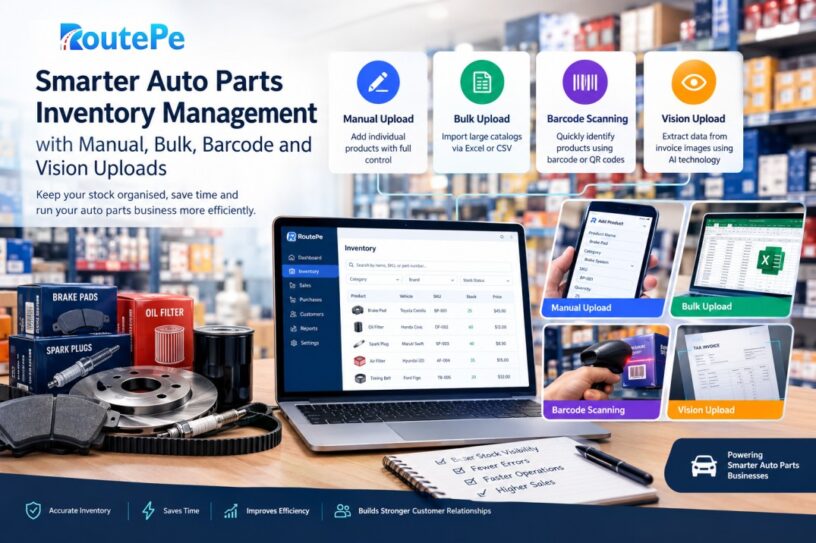
Modern technology offers a more practical approach. With RoutePe, auto parts businesses can manage their product catalog through four inventory entry methods: manual upload, bulk upload, barcode scanning and Vision based invoice extraction. Together, these options help stockists and retailers organise their inventory, maintain product information and make everyday operations more efficient.
Why Inventory Management Matters for Auto Parts Stores
An auto parts business depends on accurate product information and reliable stock records. A workshop may need a particular filter immediately, while a retailer may receive a request for a component compatible with a specific vehicle model. If the inventory records are incomplete or outdated, finding the correct part becomes unnecessarily difficult.
Effective Auto Spare Parts Inventory Management involves more than recording quantities. It includes maintaining product names, supplier details, categories, part numbers, purchase prices, selling prices and available stock. Vehicle name, model year and chassis information can also help businesses organise parts according to compatibility requirements.
Accurate records make it easier to identify available products, review stock levels and understand which items require attention. They also help businesses reduce dependence on handwritten registers and disconnected spreadsheets.
For stockists and retailers handling a large product range, a centralised digital catalog provides a more organised foundation for daily operations.
Four Ways to Add Products to Your Inventory
Every auto parts business has different requirements. A small retailer adding a few new products does not need the same process as a stockist importing hundreds of items from a supplier. RoutePe provides four ways to enter inventory, allowing businesses to choose an appropriate method for their workload.
1. Manual Product Entry for Complete Control
Manual entry is useful when adding individual products, correcting existing records or introducing a small number of new items.
Through the product entry interface, businesses can enter details such as product name, vehicle type, year or model, chassis number, SKU or part number, HSN code, category, supplier, quantity, purchase price, selling price and description. Product images can also be added to improve identification.
This method gives the user direct control over the information saved for each item. For example, a retailer receiving a new batch of engine oil filters can record the relevant product details, supplier, price and quantity without preparing a spreadsheet or processing an invoice image.
Manual entry is particularly practical for unusual components, products with incomplete supplier documentation and individual corrections. It also provides a way to review and update existing records when product information changes.
2. Bulk Upload for Large Product Catalogs
Entering hundreds of products individually can take considerable time. Bulk upload addresses this challenge by allowing businesses to import inventory through Excel or CSV files.
Instead of completing a separate form for every product, a stockist can organise product information in a spreadsheet and upload the file. RoutePe supports Excel and CSV based inventory uploads, with a sample Excel template available to help users structure their data.
This approach is useful when onboarding a large catalog, migrating existing records from spreadsheets or preparing inventory after receiving a substantial product list from a supplier.
For example, a distributor managing several hundred filters, belts, bearings and electrical components can prepare their product details in one spreadsheet rather than repeatedly opening the product entry form.
The quality of the imported information remains important. Product names, SKU values, categories, quantities and prices should be checked before uploading. Consistent formatting and unique product identifiers also help businesses maintain an organised catalog.
Bulk upload is especially valuable for businesses that want to digitise existing inventory without starting the process one product at a time.
3. Barcode Scanning for Faster Product Identification
When a customer or workshop requests a spare part, identifying the correct product quickly can make a difference to the entire sales process. Barcode scanning provides a convenient way to work with product identifiers without repeatedly typing long codes.
RoutePe includes barcode scanning support for formats such as EAN 13, EAN 8, UPC A, UPC E, Code 128, Code 39 and QR codes. Users can scan a compatible code through the device camera and use the decoded value to search the inventory or enter the corresponding SKU or part number.
Consider a stockist managing several visually similar brake pads from different manufacturers. Searching by a recognised product identifier can help locate the corresponding inventory record more quickly than browsing a long product list.
For the best results, businesses should maintain consistent product identifiers and ensure that scanned codes correspond to the correct inventory records. A barcode is useful only when its relationship to the product is properly maintained.
Barcode scanning is particularly helpful at busy counters, during product identification and when employees need to locate an existing record without navigating through multiple categories. It can complement manual entry and bulk imports by making the existing catalog easier to access.
4. Vision Based Invoice Upload for Less Data Entry
Supplier invoices often contain multiple line items, quantities, prices, product descriptions and part numbers. Manually transferring every detail into an inventory system can become a repetitive task, particularly for stockists receiving frequent deliveries.
RoutePe offers Vision based inventory upload to help reduce this workload. Users can upload an invoice image, allowing the system to extract available information from the document and prepare inventory records.
The extraction process can identify fields such as product name, vehicle details, SKU, HSN code, category, supplier, quantity, purchase price, selling price and description, depending on the information available in the invoice.
For example, a distributor receiving an invoice containing several filters, belts and bearings can use the document image as the starting point for creating inventory records instead of typing every line from scratch.
This approach is valuable because supplier documents already contain much of the information required to establish a product catalog. Extracting that information can reduce repetitive work and help businesses digitise paper based purchasing records.
However, invoice layouts and print quality vary. Some invoices may omit selling prices, product specifications or other required details. Businesses should therefore review the extracted information before relying on it for stock records. Quantities, prices, part numbers and supplier details deserve particular attention.
Vision based extraction is not a replacement for verification. It is a practical way to reduce manual effort while keeping the business responsible for the accuracy of its inventory.
Keep Inventory Organised After Product Entry
Adding products is only the beginning. A useful inventory system must also help businesses maintain accurate records and identify items that need attention.
RoutePe supports product details including current stock, low stock warning levels, dead stock thresholds, purchase prices, selling prices, categories, suppliers and product descriptions. These details help stockists understand what they have available and identify products that may require replenishment or closer review.
Low stock warnings help bring attention to products approaching their defined minimum quantities. Dead stock indicators help identify items that have remained unsold or have not recorded a sale, depending on the available sales history. This information can support purchasing decisions and help businesses review slow moving inventory.
A well maintained catalog also makes product searches more useful. Consistent naming conventions, accurate part numbers and clearly assigned categories help staff distinguish between similar components and reduce avoidable confusion.
The goal of Spare Parts Inventory Software should not simply be to store product details digitally. It should help businesses turn those details into a dependable record of their stock.
Connect Inventory with the Wider Automotive Business
Inventory becomes more valuable when it supports the wider sales and procurement process. Auto parts stockists regularly deal with workshops, retailers and other buyers who need timely information about product availability.
RoutePe is designed to connect stockists and workshops through a broader automotive supply chain platform. Its inventory offering sits alongside digital catalogs, purchase order workflows, billing and quotations, helping businesses work towards a more connected commercial process.
For example, a workshop looking for a replacement component benefits when the stockist maintains an accurate catalog. Clear product information can help the buyer identify the required item, while organised order processing can make procurement easier to manage.
Businesses can also use digital records to review their purchasing patterns, identify frequently requested products and make more informed decisions about stock levels. These benefits depend on maintaining accurate inventory information and recording transactions consistently.
For businesses seeking Spare Parts Inventory Management that supports more than basic stock entry, connecting inventory records with daily commercial workflows is an important consideration.
How to Choose the Right Inventory Entry Method
The four methods serve different purposes, and businesses do not need to rely on just one.
Manual entry is suitable for adding individual products and correcting records. Bulk upload is useful when importing large catalogs from spreadsheets. Barcode scanning helps locate products using recognised identifiers. Vision based invoice extraction can reduce repetitive typing when creating records from supplier documents.
A practical approach is to use the method that best matches the task. A new product without a prepared spreadsheet may be entered manually. A large existing catalog can be imported in bulk. An employee searching for a known part number can scan its barcode. A delivery accompanied by a detailed supplier invoice can be processed through Vision based extraction.
Whichever method is selected, businesses should check for duplicate records, incorrect quantities, inconsistent part numbers and missing prices. A short verification process can prevent small data entry problems from becoming larger operational issues.
Build a More Efficient Auto Parts Business with RoutePe
Managing an auto parts store involves much more than keeping products on shelves. Businesses need accurate records, faster product identification, visibility into stock levels and organised information that supports purchasing and sales.
RoutePe brings four inventory entry methods together in one system, giving stockists and retailers flexibility in how they build and maintain their catalogs. Manual entry offers control, bulk upload supports larger imports, barcode scanning helps locate products and Vision based invoice extraction reduces repetitive document entry.
As automotive businesses handle growing product catalogs and serve more workshops, these capabilities can provide a practical foundation for digital inventory operations.
With Auto Spare Parts Inventory Software from RoutePe, businesses can take a step towards more organised stock records and a connected automotive supply chain. The objective is simple: spend less time managing repetitive inventory tasks and more time serving customers, fulfilling orders and growing the business.